



问题背景:整理博客时发现大量 0B 图片
WordPress上传目录出现大量0B图片怎么办?一键检测与批量清理教程
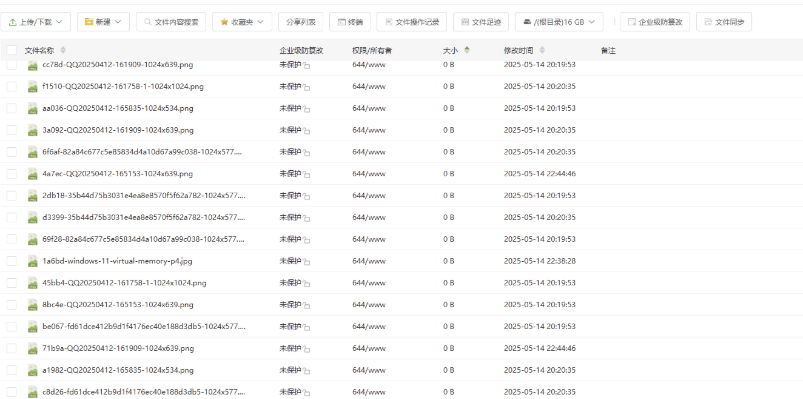
今天在整理博客图片资源时,我发现一个比较严重的问题:
在 WordPress 的上传目录(uploads/年/月)中,居然存在大量 0B(0字节)图片。
这些文件的特点:
- 文件名正常(看起来像正常上传)
- 扩展名正常(jpg / png / webp 等)
- 但文件大小为 0B
也就是说,这些图片实际上是无效文件。
为什么 0B 图片很危险?
这些 0B 图片看起来不起眼,但其实会带来很多问题:
- 占用 inode,拖慢服务器
- 影响 SEO(搜索引擎抓取失败)
- 图片加载报错,影响用户体验
- CDN 同步异常
- 浪费存储空间
如果你的网站是长期运营的,这类问题会越来越严重。
手动删除的问题:宝塔操作太容易误删
最开始我尝试用宝塔面板去删除:
- 进入 uploads/2025/05 目录
- 按大小排序
- 手动勾选 0B 文件
但是很快发现几个问题:
- 文件太多,容易漏选
- 误选风险极高(正常图片也可能删掉)
- 操作非常耗时间
于是我决定写一个工具,一键解决这个问题。
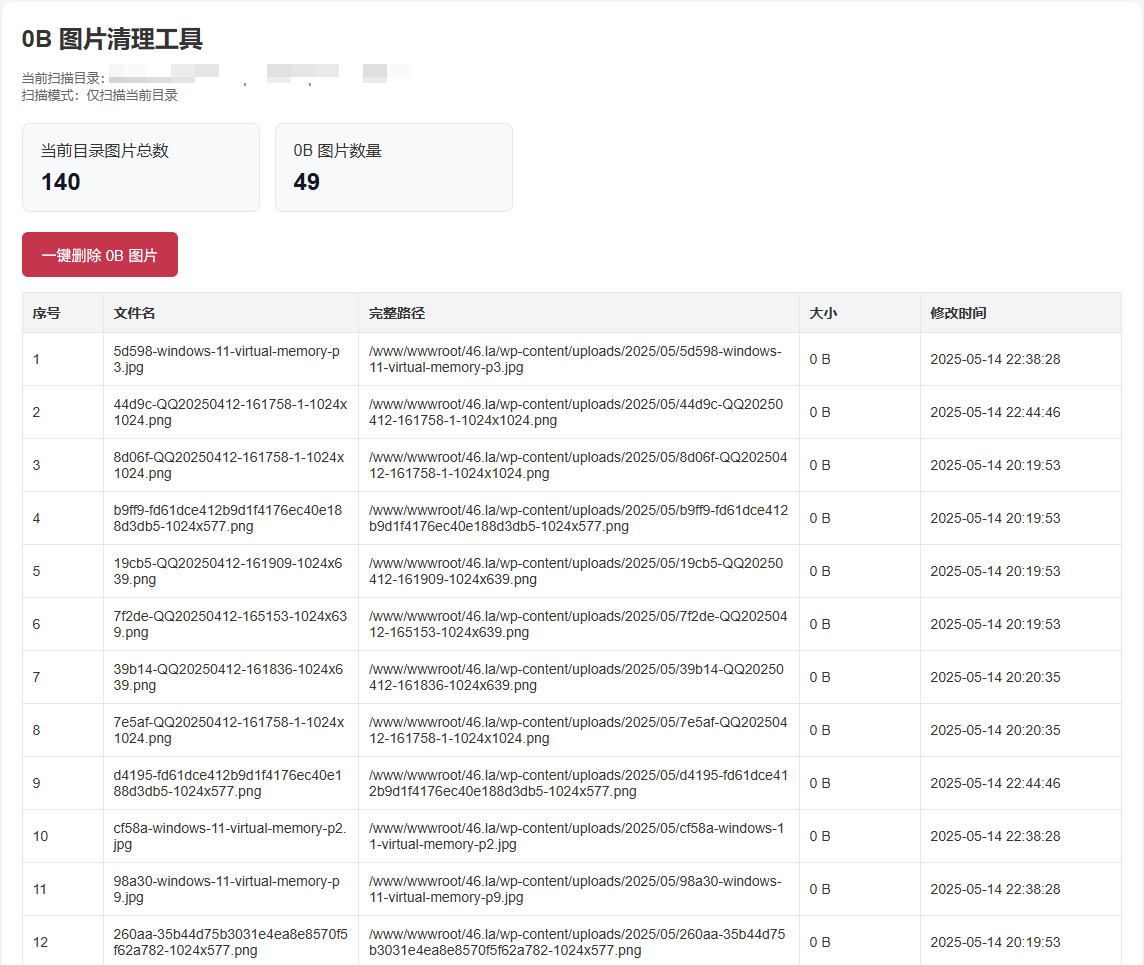
解决方案:使用 PHP 批量检测 + 删除 0B 图片
WordPress上传目录出现大量0B图片怎么办?一键检测与批量清理教程
核心思路非常简单:
- 扫描指定目录
- 识别图片文件
- 筛选出 size = 0 的文件
- 支持一键删除
下面是完整代码:
<?php
header('Content-Type:text/html; charset=utf-8');

// =========================
// 配置区域
// =========================

// 要扫描的目录
$scanDir = __DIR__;
// 如果你想固定扫描 uploads/2025/05 目录,也可以改成:
// $scanDir = '/www/wwwroot/46.la/wp-content/uploads/2025/05';

// 是否递归扫描子目录
$recursive = false;

// 允许扫描的图片后缀
$imageExts = ['jpg', 'jpeg', 'png', 'gif', 'webp', 'bmp', 'ico', 'avif'];

// 安全校验 key,防止别人直接调用删除
$deleteToken = 'del_zero_img_2025';

// =========================
// 工具函数
// =========================

function isImageFile($file, $imageExts) {
    $ext = strtolower(pathinfo($file, PATHINFO_EXTENSION));
    return in_array($ext, $imageExts, true);
}

function scanImages($dir, $imageExts, $recursive = false) {
    $allImages = [];
    $zeroImages = [];

    if (!is_dir($dir)) {
        return [$allImages, $zeroImages];
    }

    if ($recursive) {
        $iterator = new RecursiveIteratorIterator(
            new RecursiveDirectoryIterator($dir, FilesystemIterator::SKIP_DOTS)
        );
    } else {
        $iterator = new DirectoryIterator($dir);
    }

    foreach ($iterator as $fileInfo) {
        if ($fileInfo->isFile()) {
            $filePath = $fileInfo->getPathname();

            if (isImageFile($filePath, $imageExts)) {
                $size = @filesize($filePath);
                $mtime = @filemtime($filePath);

                $info = [
                    'path' => $filePath,
                    'name' => basename($filePath),
                    'size' => ($size === false ? -1 : $size),
                    'mtime' => $mtime ? date('Y-m-d H:i:s', $mtime) : '-',
                ];

                $allImages[] = $info;

                if ($size === 0) {
                    $zeroImages[] = $info;
                }
            }
        }
    }

    return [$allImages, $zeroImages];
}

function deleteFiles($files) {
    $success = [];
    $failed = [];

    foreach ($files as $file) {
        $path = $file['path'];
        if (is_file($path)) {
            if (@unlink($path)) {
                $success[] = $path;
            } else {
                $failed[] = $path;
            }
        }
    }

    return [$success, $failed];
}

// =========================
// 扫描
// =========================

list($allImages, $zeroImages) = scanImages($scanDir, $imageExts, $recursive);

$totalImages = count($allImages);
$totalZeroImages = count($zeroImages);

// =========================
// 删除操作
// =========================

$deleteMsg = '';
$deletedSuccess = [];
$deletedFailed = [];

if ($_SERVER['REQUEST_METHOD'] === 'POST' && isset($_POST['action']) && $_POST['action'] === 'delete_zero') {
    $token = $_POST['token'] ?? '';

    if ($token !== $deleteToken) {
        $deleteMsg = '安全校验失败,禁止删除。';
    } else {
        list($deletedSuccess, $deletedFailed) = deleteFiles($zeroImages);
        $deleteMsg = '删除完成:成功删除 ' . count($deletedSuccess) . ' 个,失败 ' . count($deletedFailed) . ' 个。';

        // 删除后重新扫描
        list($allImages, $zeroImages) = scanImages($scanDir, $imageExts, $recursive);
        $totalImages = count($allImages);
        $totalZeroImages = count($zeroImages);
    }
}
?>
<!DOCTYPE html>
<html lang="zh-CN">
<head>
    <meta charset="UTF-8">
    <title>0B图片清理工具</title>
    <style>
        body{
            font-family: Arial, "Microsoft YaHei", sans-serif;
            background:#f5f7fa;
            margin:0;
            padding:20px;
            color:#333;
        }
        .wrap{
            max-width:1100px;
            margin:0 auto;
            background:#fff;
            border-radius:10px;
            padding:20px;
            box-shadow:0 2px 10px rgba(0,0,0,.06);
        }
        h1{
            margin-top:0;
            font-size:24px;
        }
        .info{
            display:flex;
            gap:15px;
            flex-wrap:wrap;
            margin:20px 0;
        }
        .card{
            background:#f8fafc;
            border:1px solid #e5e7eb;
            border-radius:8px;
            padding:15px 18px;
            min-width:200px;
        }
        .card strong{
            display:block;
            font-size:24px;
            color:#111827;
            margin-top:8px;
        }
        .btn{
            display:inline-block;
            background:#e11d48;
            color:#fff;
            border:none;
            padding:12px 20px;
            border-radius:6px;
            cursor:pointer;
            font-size:15px;
        }
        .btn:hover{
            background:#be123c;
        }
        .msg{
            margin:15px 0;
            padding:12px 15px;
            border-radius:6px;
            background:#fef3c7;
            color:#92400e;
        }
        table{
            width:100%;
            border-collapse:collapse;
            margin-top:15px;
            background:#fff;
        }
        th, td{
            border:1px solid #e5e7eb;
            padding:10px;
            text-align:left;
            font-size:14px;
            word-break:break-all;
        }
        th{
            background:#f3f4f6;
        }
        .empty{
            padding:20px;
            background:#f0fdf4;
            border:1px solid #bbf7d0;
            color:#166534;
            border-radius:8px;
            margin-top:15px;
        }
        .danger{
            color:#dc2626;
            font-weight:bold;
        }
        .small{
            color:#666;
            font-size:13px;
        }
    </style>
</head>
<body>
<div class="wrap">
    <h1>0B 图片清理工具</h1>

    <div class="small">
        当前扫描目录:<?php echo htmlspecialchars($scanDir); ?><br>
        扫描模式:<?php echo $recursive ? '递归扫描子目录' : '仅扫描当前目录'; ?>
    </div>

    <div class="info">
        <div class="card">
            当前目录图片总数
            <strong><?php echo $totalImages; ?></strong>
        </div>
        <div class="card">
            0B 图片数量
            <strong class="danger"><?php echo $totalZeroImages; ?></strong>
        </div>
    </div>

    <?php if ($deleteMsg): ?>
        <div class="msg"><?php echo htmlspecialchars($deleteMsg); ?></div>
    <?php endif; ?>

    <?php if ($totalZeroImages > 0): ?>
        <form method="post" onsubmit="return confirm('确定要一键删除当前目录下所有 0B 图片吗?此操作不可恢复!');">
            <input type="hidden" name="action" value="delete_zero">
            <input type="hidden" name="token" value="<?php echo htmlspecialchars($deleteToken); ?>">
            <button type="submit" class="btn">一键删除 0B 图片</button>
        </form>

        <table>
            <thead>
                <tr>
                    <th width="60">序号</th>
                    <th>文件名</th>
                    <th>完整路径</th>
                    <th width="100">大小</th>
                    <th width="180">修改时间</th>
                </tr>
            </thead>
            <tbody>
            <?php foreach ($zeroImages as $k => $file): ?>
                <tr>
                    <td><?php echo $k + 1; ?></td>
                    <td><?php echo htmlspecialchars($file['name']); ?></td>
                    <td><?php echo htmlspecialchars($file['path']); ?></td>
                    <td>0 B</td>
                    <td><?php echo htmlspecialchars($file['mtime']); ?></td>
                </tr>
            <?php endforeach; ?>
            </tbody>
        </table>
    <?php else: ?>
        <div class="empty">当前目录没有发现 0B 图片。</div>
    <?php endif; ?>
</div>
</body>
</html>
使用方法
步骤 1:上传 PHP 文件
将代码保存为:
clean-zero-images.php
然后上传到你要清理的目录,例如:
/wp-content/uploads/2025/05/
步骤 2:访问脚本
浏览器访问:
http://你的域名/uploads/2025/05/clean-zero-images.php
步骤 3:一键删除
点击页面中的:
一键删除0B图片
即可完成清理。
极简版代码
<?php
$dir = __DIR__;
$exts = ['jpg','jpeg','png','gif','webp','bmp','ico','avif'];

$files = scandir($dir);
$total = 0;
$zero = [];

foreach ($files as $file) {
    if ($file === '.' || $file === '..') continue;

    $path = $dir . DIRECTORY_SEPARATOR . $file;
    if (!is_file($path)) continue;

    $ext = strtolower(pathinfo($path, PATHINFO_EXTENSION));
    if (!in_array($ext, $exts)) continue;

    $total++;

    if (filesize($path) === 0) {
        $zero[] = $path;
    }
}

if (isset($_GET['del']) && $_GET['del'] == 1) {
    $ok = 0;
    foreach ($zero as $f) {
        if (@unlink($f)) $ok++;
    }
    echo "已删除 {$ok} 个 0B 图片<br><br>";

    // 重新统计
    $files = scandir($dir);
    $total = 0;
    $zero = [];
    foreach ($files as $file) {
        if ($file === '.' || $file === '..') continue;
        $path = $dir . DIRECTORY_SEPARATOR . $file;
        if (!is_file($path)) continue;
        $ext = strtolower(pathinfo($path, PATHINFO_EXTENSION));
        if (!in_array($ext, $exts)) continue;
        $total++;
        if (filesize($path) === 0) $zero[] = $path;
    }
}

echo "当前目录图片总数:{$total}<br>";
echo "0B 图片数量:" . count($zero) . "<br><br>";

if ($zero) {
    echo '<a href="?del=1" onclick="return confirm(\'确定删除所有0B图片吗?\')">一键删除0B图片</a><br><br>';
    foreach ($zero as $f) {
        echo htmlspecialchars(basename($f)) . "<br>";
    }
} else {
    echo "没有 0B 图片";
}
?>
进阶优化建议
如果你的网站经常出现 0B 图片,建议进一步排查:
- PHP 上传限制(upload_max_filesize)
- 服务器磁盘是否满了
- WordPress 插件冲突
- 图片压缩插件异常
- CDN 回源失败
另外可以考虑:
- 定期自动扫描 uploads 目录
- 写定时任务(crontab)自动清理
总结
这次在整理博客时发现的 0B 图片问题,其实是很多站长都会遇到的坑。
用宝塔手动删除不仅效率低,而且风险很高。
通过一个简单的 PHP 脚本,我们可以:
- 快速统计问题规模
- 精准识别异常文件
- 一键安全清理
如果你的网站也有类似问题,强烈建议尽快清理,避免长期影响网站性能和 SEO。
© 原创声明:本文由 四六啦工具 于 1 年 前发表在 代码笔记 分类目录中,最后更新于2026年3月23日,转载请注明本文永久链接:https://www.46.la/wordpress-delete-zero-byte-images
相关文章
本文暂时没有评论,来添加一个吧(●'◡'●)